
BMS analytics
Building management system software, turned into decisions.
Connect Siemens, Schneider, Honeywell, Trend, Bastec — or anything BACnet, Modbus, OPC UA or oBIX. Explore reads from your existing BMS and returns a prioritised action queue. It's how teams run energy management systems for commercial buildings on the BMS they already have.
The problem
Why most building management system software stops at the dashboard.
Data without decisions.
More charts, more colours, more tabs. None of which tells the operator what to do this morning.
Dashboards without actions.
A view is a question. An action is an answer. Most platforms ship the question and call it a product.
Alarms without context.
A buzzer that fires on every threshold breach is ignored within a week. Explore ranks every alert by severity and likely cause.
How it works
From a BMS feed to ranked queue.
01
Your BMS
Siemens · Schneider · Honeywell · Trend · Bastec
02
Ingest
BACnet · Modbus · OPC UA · oBIX
03
FrostDynamics engine
Anomaly · Forecast · Causal
04
Prioritised queue
What to act on. In what order.
Supported integrations
If your BMS speaks any of these, we read from it.
BMS vendors
Protocols
Missing one? Tell us what you run.
Focused on energy specifically? See our energy management software.
How Explore connects to Siemens Desigo, Schneider EcoStruxure, Honeywell Niagara, Johnson Controls Metasys and Honeywell Trend, in detail.
The question every vendor estate asks
Building Advisor already does analytics. Why add Explore?
One model across every vendor.
Building Advisor reads your Schneider estate. Desigo's tools read Siemens. A real portfolio runs both, plus meters, plus ten years of IoT retrofits. Explore reads all of it into one ontology, so a fault that spans two systems still surfaces as one finding.
Physics, not a chatbot.
We once watched a pure-LLM pilot suggest switching off the AC at 30°C outside. Explore can't make that mistake. FrostDynamics, the physical model of your building, checks every answer, and advice that violates thermodynamics never reaches your queue.
Nothing to rip out.
Vendor analytics assume you're current on their stack and their licences. Explore reads the BMS you have now, whatever its vintage. Keep Building Advisor if it earns its keep. Explore sees the same points and ranks the whole portfolio in one queue.
Local-only BMS
No BMS cloud licence? You don't need one.
Most buildings run a capable BMS that was commissioned years ago and then left alone. The cloud subscription was never bought, or it lapsed quietly. So every data point the building produces sits on one PC in the plant room, and nobody above building level ever sees it.
Explore connects that PC. The FrostLogic Edge Agent goes on that machine, reads your BMS, meters and sensors over BACnet, OPC UA, Modbus or oBIX, and writes back to the points you have granted it. Write starts off; see Automation for how scopes work. Nothing new bolted into the building. Skip the data-aggregator middleman too. Explore pulls from the BMS directly and stores one copy, in the EU. Not sure which of those protocols your estate actually runs? Our BACnet vs Modbus vs OPC UA guide breaks down the differences.
Bought EcoStruxure but run it on-prem? Same answer. One agent install, and the data finally leaves the building.
Commissioned in 2009, never upgraded, licence lapsed. Still connectable.
Deployment
How Explore connects.
Three ways in. None of them involve hardware.
What you run
Three routes in
Vendor cloud API.
Your BMS already has a cloud connection? Then connecting is a client ID and a token.
Same dayAgent on the BMS PC.
For on-prem and local-only installations. The FrostLogic Edge Agent goes on the existing PC or server, reads your BMS, meters and sensors over BACnet, OPC UA, Modbus or oBIX, and writes back to the points you have granted it. Write starts off. Installed remotely.
An afternoonA connector we build.
Running something we haven't met? We build the connector.
Under a weekWhat you get
One ranked queue
Every issue detected, costed and ordered by what it's worth fixing.
Scale it to a portfolioThe full picture, vendor by vendor, is under BMS integrations.
Also storing the manuals and compliance evidence behind those readings? See Data Warehouse.
Also want to catch equipment failure before it happens? See Predictive Maintenance.
Ready to let Explore write back inside a scope you grant? See Automation.
Connect one building. Three weeks. We show you what we find.
Pick one building, even a couple of fan coil units. We connect it remotely, let two to three weeks of data accumulate, then go through the findings with you. There's nothing to install and no commitment past the pilot.
Remote, and it writes nothing until you grant it a scope.
Worked example
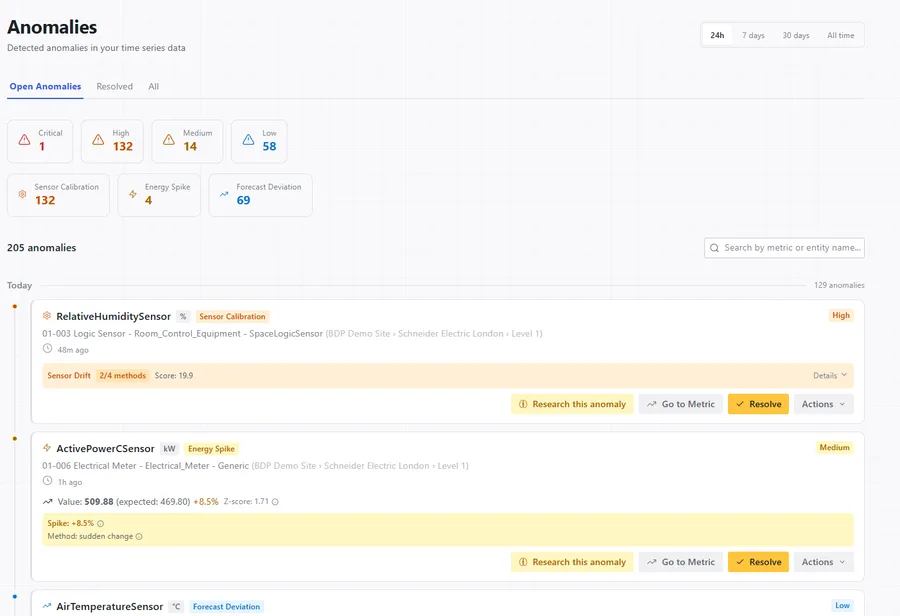
A single floor's HVAC drift, captured live.
- 1
Sensor drift detected.
A return-air temperature sensor on floor 4 starts drifting +0.4°C/day relative to the supply-air physics model. Statistical-only platforms miss it; physics-aware methods catch it on day three.
- 2
Causal filter applied.
Causal filtering connects the drift to elevated chiller cycling downstream — and suppresses the dozen related “alerts” the BMS would have fired.
- 3
Ranked, assigned, resolved.
Single ticket lands in the operator queue with severity “High” and suggested action “recalibrate or replace”. Mean time to detect drops from weeks to days. Audit trail is captured automatically.
Beyond HVAC
One queue for HVAC, IoT and every building monitoring system.
An IoT building management system, read as one.
Modern buildings bolt IoT sensors onto the BMS — air quality, occupancy, sub-metering, leak and energy sensors over MQTT and M-Bus. Explore reads the BMS and the IoT layer together, and ranks them in a single queue instead of a second dashboard.
HVAC, where most of the waste and the faults live.
An HVAC building management system generates the bulk of a building's telemetry and most of its avoidable cost. Explore grounds every HVAC signal in the plant's physics — catching a drifting sensor or a fighting setpoint before it becomes a comfort complaint or an energy spike.
From building monitoring to building decisions.
Most building monitoring systems stop at charts and threshold alarms. Explore cross-checks each signal, suppresses the alarm storm, and hands the operator a ranked list of what to act on — monitoring that ends in a decision, not a wall of metrics. Across many buildings, that becomes building management system analytics at portfolio scale.
Before you ask
What teams ask about running this on their BMS.
Software that connects to a building's BMS and turns its raw points into something an operator can act on. Explore goes past monitoring: it ranks every issue by severity and likely cause, then proposes the fix.
A BMS is the control layer wired into a building's HVAC, lighting and metering: the Siemens, Schneider, Honeywell, Trend or Bastec software and controllers that run the equipment, opening dampers, cycling chillers, switching lighting circuits. On its own it runs the building. It doesn't rank what needs attention or tell you what to do next. Explore adds that layer on top, reading the BMS and turning its raw points into issues ranked by severity and likely cause.
No. It reads from your existing BMS, and adds an analytics and decision layer on top. It works with Siemens, Schneider, Honeywell, Trend and Bastec, or anything speaking BACnet, Modbus, OPC UA or oBIX.
BACnet, Modbus, OPC UA, oBIX, MQTT and M-Bus, across Siemens, Schneider, Honeywell, Trend and Bastec. If you run something else, tell us what it is.
Most built-in analytics stop at charts and threshold alarms. Explore cross-checks each signal against the building's physics, suppresses the alarm storms, and hands the operator one ranked queue instead of a wall of metrics.
The demo runs against a sample of your data. In production most teams see ranked findings in the first week, with no new hardware.
Yes. It reads the BMS and the IoT sensors layered on top — air quality, occupancy, sub-metering, leak and energy sensors over BACnet, Modbus, OPC UA, oBIX, MQTT and M-Bus — and ranks them in one queue. It's and adds nothing to the field.
Yes. HVAC is where most building telemetry and most avoidable cost sit. Explore grounds every HVAC signal in the plant's physics, so it catches drift and fighting setpoints the BMS's own thresholds miss.
A building monitoring system shows you charts and fires alarms. Explore goes one step further: it cross-checks each signal, suppresses the alarm storm, and returns a ranked list of what to fix first. Monitoring tells you what happened; Explore tells you what to do.
Building Advisor analyses your Schneider estate, and it does that fine. Explore reads your non-Schneider systems into the same model, grounds every finding in the building's physics instead of a language model's guess, and ranks the whole portfolio into one queue. It runs alongside Building Advisor, so there's nothing to rip out.
Most vendor assistants are a language model with access to your data. Ask one the wrong question and it will confidently suggest something physics forbids. We've seen one propose shutting off cooling at 30°C outside. Explore's reasoning runs through FrostDynamics, a world model of your building, which checks every answer against thermodynamics before you see it.
Yes. We install the FrostLogic Edge Agent on that PC or server, remotely, usually in an afternoon. It reads your BMS, meters and sensors, and writes back to the points you have granted it. Write starts off. There's no hardware, and no BMS cloud subscription needed, even on estates where the licence lapsed years ago.
No. Explore is the aggregator. It pulls from the BMS directly, through the vendor's cloud API where one exists or through a local agent where one doesn't, and stores one copy in the EU. Paying a middleman to move your own data first doubles the cost and adds a procurement round.
No. Explore connects through your vendor's cloud API, through the FrostLogic Edge Agent on the existing BMS PC, or through a custom connector we build when you run something unusual. Nothing gets bolted into the building.
One building, three weeks. We connect remotely, usually to a handful of units, let the data accumulate, and review what Explore found together. If the queue isn't worth your time, you've lost three weeks.
For Explore it means six anomaly detection methods and forecasting run over the data your building already produces, and the output is a ranked queue of decisions with the evidence attached. Write access starts off. You grant write access one scope at a time, and you decide whether each change waits for a person or runs on its own.
What's your building not telling you?
Tell us what you're trying to figure out: energy drift, a BMS you don't trust, compliance you're chasing. We listen first, then tell you straight whether Explore helps. 30 or 60 minutes, your pick. No commitment either way.